SPORTDOG® SPORTHUNTER® 1225 MODES EXPLAINED
WHY WOULD YOU WANT TO CHANGE YOUR MODE?
Training Needs: Changing modes allows you to set the function for the buttons on your remote handheld to meet your training needs. Your handheld comes factory set tomode 1. To use a vibration signal, you will need to change modes.
Additional Dogs: If you are adding another dog to your system, you need to put your handheld in a multiple dog mode.
New Handheld: If you have a new handheld and need to change the mode to what you had on your previous remote.
Reset Settings: If your buttons are not delivering the desired signal, reset it to the mode it was in previously.
IMPORTANT INFORMATION
For mode-changing instructions, go to HOW TO CHANGE THE MODES ON MY SPORTDOG® SPORTHUNTER® 1225 HANDHELD.
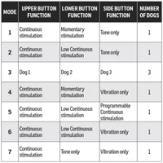
This chart shows a comprehensive view of what each mode will do. Stimulation levels are set by the intensity dial. Click on each mode below for a more in-depth explanation.
CONTACT CUSTOMER CARE
If you need further assistance, please contact our customer care team.