HOW TO PAIR OR ADD A COLLAR TO MY CABELA’S® GUN DOG® GS-8000 OR GS-9000 HANDHELD
IMPORTANT INFORMATION
The toggle switch allows you to switch between Dog 1 (toggle switch left) and Dog 2 (toggle switch right) quickly and easily.
Use the toggle switch to select adog.
1 Dog: If you are using one collar with the handheld, have the toggle switch to the left. The Dog 1 icon will display in the top left corner of the screen.
2 Dogs: If you are adding another collar to the system, place the toggle switch to the right. The Dog 2 icon will appear in the top right corner of the screen.
Power the collar off, confirming there are no lights after 10 seconds.
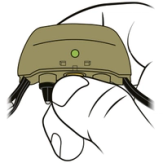
Press and hold the power button on the collar receiver. The Indicator Light will turn green. Continue to hold until the light goes out, then release the power button.
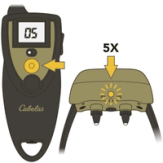
Press and hold the upper button with the bump on the remote transmitter until you see the collar Indicator Light flash green 5 times. Your remote transmitter and collar are now paired.
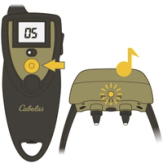
Test pairing.
- Adjust the stimulation level to 00.
- Press the upper button with the bump. The collar will tone, indicating it is paired.
- If there is no tone, repeat the pairing process.
CONTACT CUSTOMER CARE
If you need further assistance, please contact our customer care team.