HOW DO I CHANGE THE MODE ON MY CABELA’S® GUN DOG GS-4100
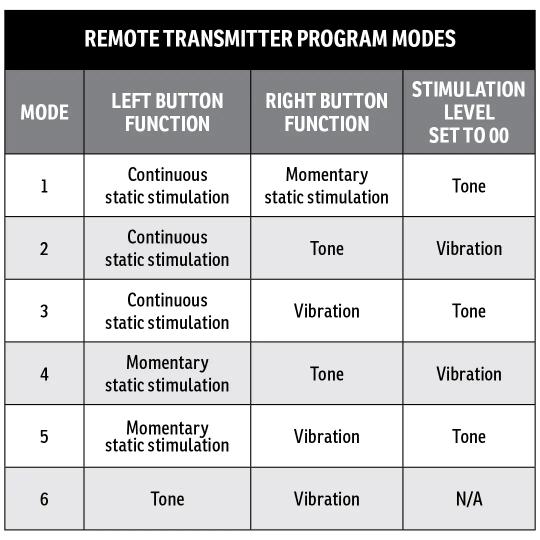
Identify what mode you want by deciding what you want your buttons to do. For help choosing your mode, visit WHAT ARE MODES AND WHEN DO I CHANGE THEM ON MY CABELA’S GUN DOG REMOTE TRAINER GS-4100.
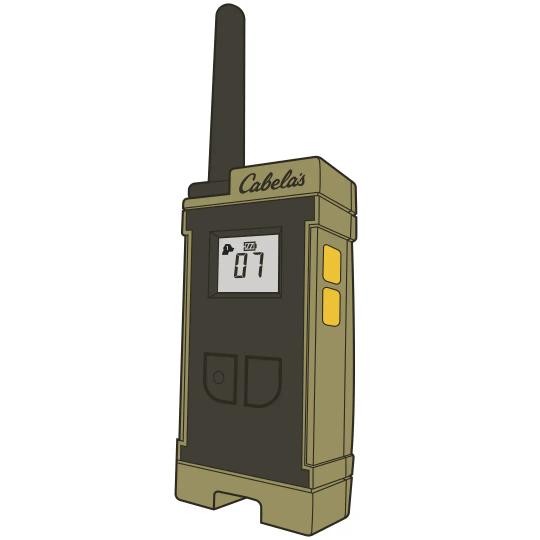
Press and hold the Up and Down buttons on the side of the handheld remote at the same time for 3 seconds. When the unit displays the current mode number (1-6) and PROG appears on the screen, release the Up and Down buttons.
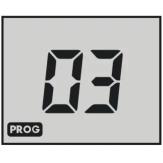
Use the Up and Down buttons to select the number of the mode you want.
Press and release the left button to lock in your selection. The screen will flash three times and the PROG will disappear indicating the new mode has been saved.
Pair your collar. For assistance pairing your collar, visit HOW TO PAIR A COLLAR TO THE CABELA'S GUN DOG GS-4100 REMOTE TRAINER.
CONTACT CUSTOMER CARE
If you need further assistance, please contact our customer care team.